
Electronics Engineering Project Blogs
Automatic Power Factor Controller Using 8051 Microcontroller – Complete Student Guide

Oct
🧠 Introduction
An automatic power factor controller using 8051 microcontroller is one of the most important learning projects for electrical and electronics engineering students. Power factor plays a critical role in how efficiently electrical energy is used, especially in systems that involve motors, transformers, and inductive loads.
In real-world electrical installations, low power factor leads to higher current, increased losses, voltage drops, and penalties from electricity boards ⚡. This project helps students understand, measure, and automatically correct power factor using embedded control logic instead of manual calculation.
If you are preparing for final year projects, lab demonstrations, or viva, this project builds strong conceptual clarity while also showing real industrial relevance 🧠.
🎯 Project Overview and Objective
The main objective of this project is to automatically improve power factor by switching capacitor banks based on real-time load conditions.
This project is designed for:
- Diploma, ITI, BSc, BTech, MTech students
- Electrical and electronics engineering labs
- Practical demonstrations and evaluations
What problem does it solve?
Inductive loads such as motors draw reactive power, which reduces power factor. This project detects poor power factor and automatically compensates it using capacitor banks, improving system efficiency and power quality 📈.
👉 Download Project PPT , Synopsis & report
Engineering students can download the complete project documentation below. The ZIP file includes a detailed synopsis and a ready-to-use PPT for seminars, viva, and Presentations.
This article belongs to the Automatic Power Factor Correction (APFC) Project Hub, which presents and compares different implementation approaches used for power factor correction.
Students who wish to implement this design practically can use the Ready-Made Project Kit, suitable for lab demonstrations, evaluations, and final-year submissions.
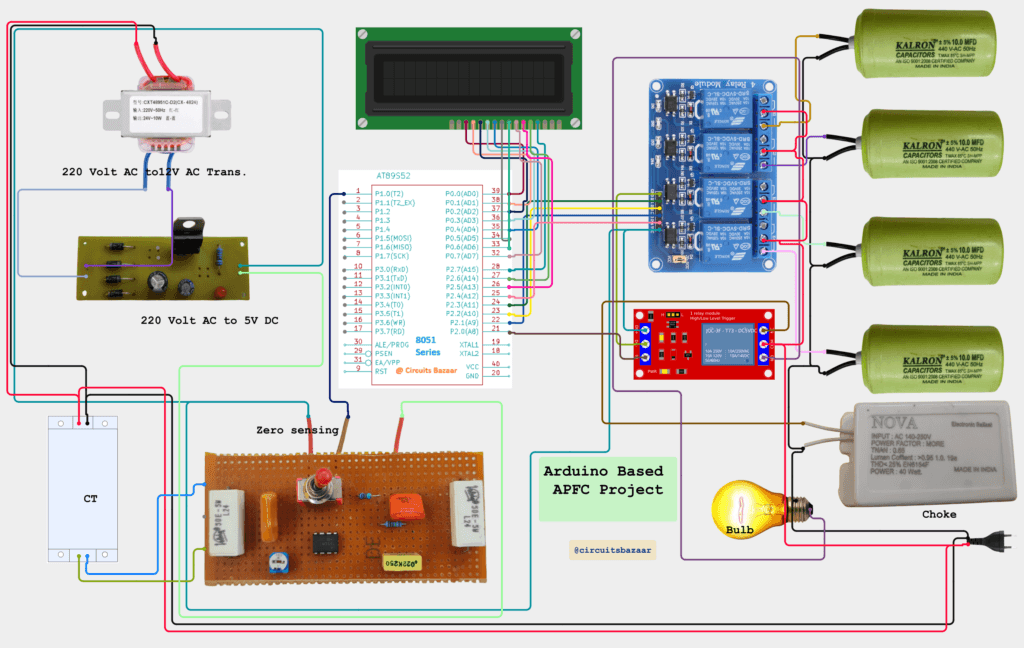
Circuit Diagram of APFC / Automatic Power Factor Controlller Project :-
Video Demonstration :-
🔌 Components Used (Detailed Explanation)
| Component | Purpose in the Project | Why This Component Is Used |
|---|---|---|
| Current Transformer (CT) | Measures the load current flowing through the system | The CT provides electrical isolation and safely converts high line current into a proportional low-level signal. This current information is essential for calculating apparent power, reactive power, and power factor in real-time ⚡. |
| Step-Down Transformer | Steps down high AC mains voltage to a lower level | Since the microcontroller operates at low voltage (5V), the step-down transformer reduces the mains voltage to a safe level, which is later rectified and regulated for control circuitry 🔋. |
| 8051 Microcontroller (AT89C51) | Central control and decision-making unit | The 8051 microcontroller acts as the brain of the APFC system. It reads current inputs, performs power factor calculations, controls relays for capacitor switching, and updates the LCD display 🧠. |
| Relay Module | Switches capacitor banks automatically | Relays electrically isolate the low-power microcontroller from high-power capacitor banks. They allow automatic connection and disconnection of capacitors based on power factor requirements 🔌. |
| Capacitor Bank (Multiple Capacitors) | Supplies reactive power for correction | Capacitors provide leading reactive power that compensates for lagging reactive power caused by inductive loads. Different capacitor values allow step-wise power factor correction 📈. |
| Current Sensing Unit | Signal conditioning for CT output | The raw CT signal is conditioned using resistors and filtering components so that it can be safely read by the microcontroller. This ensures accurate and stable current measurement 📊. |
| Inductive, Capacitive, and Resistive Load Selector | Simulates different load conditions | This selector allows students to test the system under various load types. Inductive loads create low power factor, resistive loads maintain unity power factor, and capacitive loads help understand over-correction scenarios 🧪. |
| LCD Display (16×2) | Displays electrical parameters and system status | The LCD shows voltage, current, real power, and power factor values in real time. It also helps during demonstrations, viva, and debugging by providing visual feedback 📟. |
| Red and Green LEDs | Visual indication of power factor status | The green LED indicates acceptable power factor, while the red LED warns of poor power factor. These indicators make the system intuitive and easy to understand during demos 🚦. |
| Buzzer | Audible alert during correction | The buzzer provides an audio indication when capacitor banks are switched ON or OFF. This helps students clearly observe correction events during practical demonstrations 🔔. |
| Resistors | Current limiting and biasing | Resistors are used for LED current limiting, transistor base biasing, and signal conditioning. They protect components and ensure stable operation of the circuit 🔧. |
| Capacitors (Passive) | Filtering and voltage stabilization | These capacitors smooth rectified DC voltage and reduce noise in the power supply and signal paths, ensuring reliable microcontroller operation 🔋. |
| Diodes (e.g., 1N4007) | Protection and rectification | Diodes are used for AC to DC rectification and as flyback diodes across relay coils to protect transistors and the microcontroller from voltage spikes ⚠️. |
| Transistors (e.g., BC547) | Relay driving and signal amplification | Since microcontroller pins cannot drive relays directly, transistors are used as switching amplifiers to safely control relay coils 💡. |
This component combination closely reflects industrial APFC panels, making the learning highly practical 🔌.
🔷 Block Diagram and Working Logic
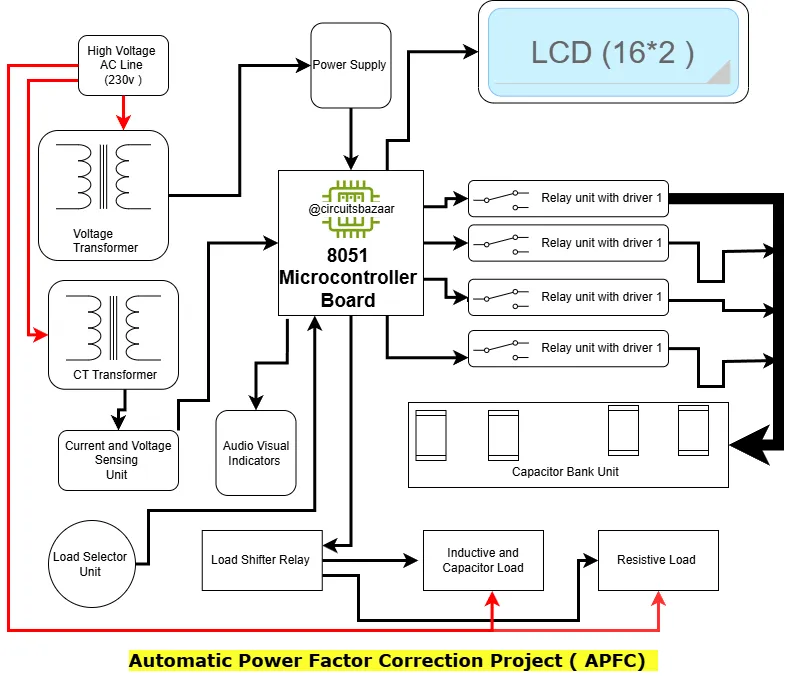
The block diagram explains how signals flow through the system:
- Load draws current from the supply
- Current transformer senses load current
- Microcontroller calculates power factor
- Decision logic compares PF with threshold
- Relays switch capacitor banks accordingly
- LCD and indicators display system status
This flow helps students visualize how measurement → decision → correction happens automatically 🧠.
Working
The working of an Automatic Power Factor Controller can be understood in the following steps:
Current Measurement: The current transformer measures the current flowing through the load and sends this data to the current sensing unit.
Voltage Step-Down: The step-down transformer reduces the voltage to a level suitable for the microcontroller.
Data Processing: The 8051 microcontroller receives the current and voltage data, calculates the power factor, and determines if correction is needed.
Indicator Status: Based on the power factor, the microcontroller activates the red or green LED indicators. A green LED indicates an optimal power factor, while a red LED indicates a need for correction.
Capacitor Bank Activation: If correction is needed, the microcontroller activates the relay, switching on the required number of capacitors from the capacitor bank to correct the power factor.
Continuous Monitoring: The system continuously monitors the power factor and makes adjustments as necessary.
Circuit Diagram
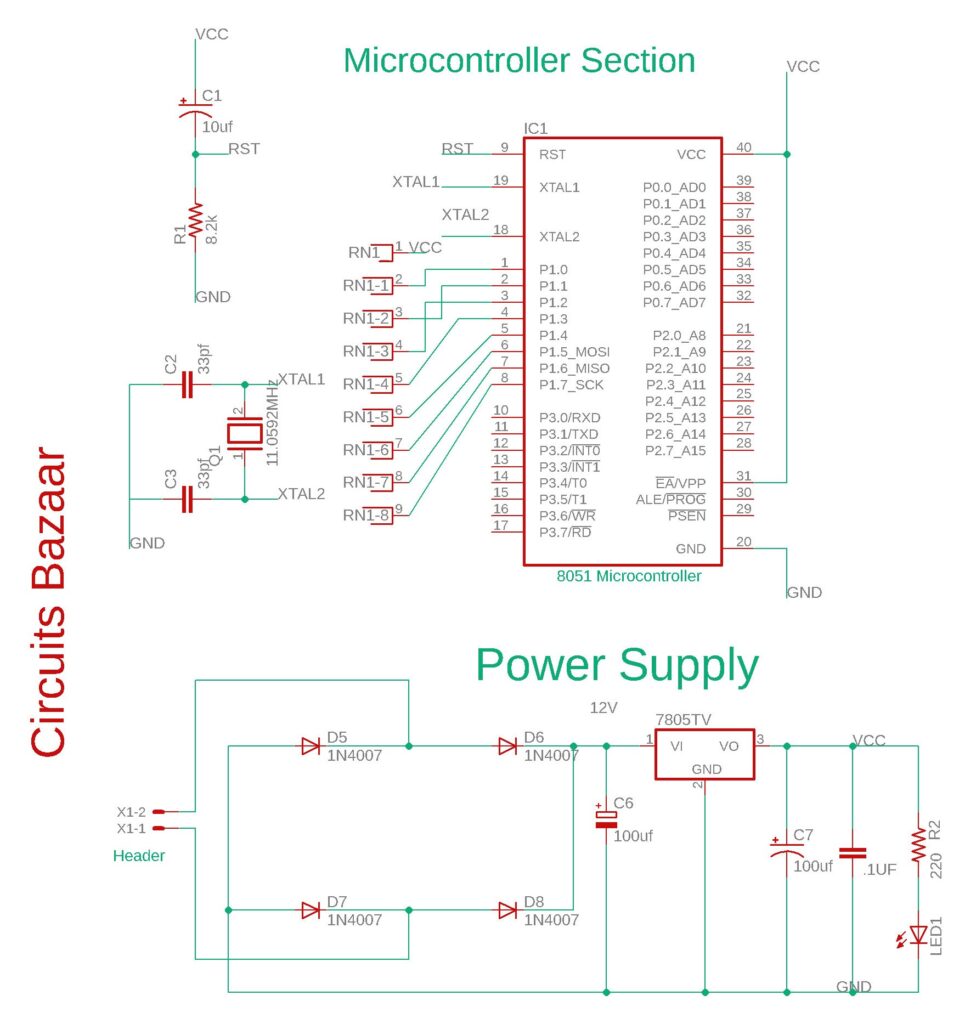
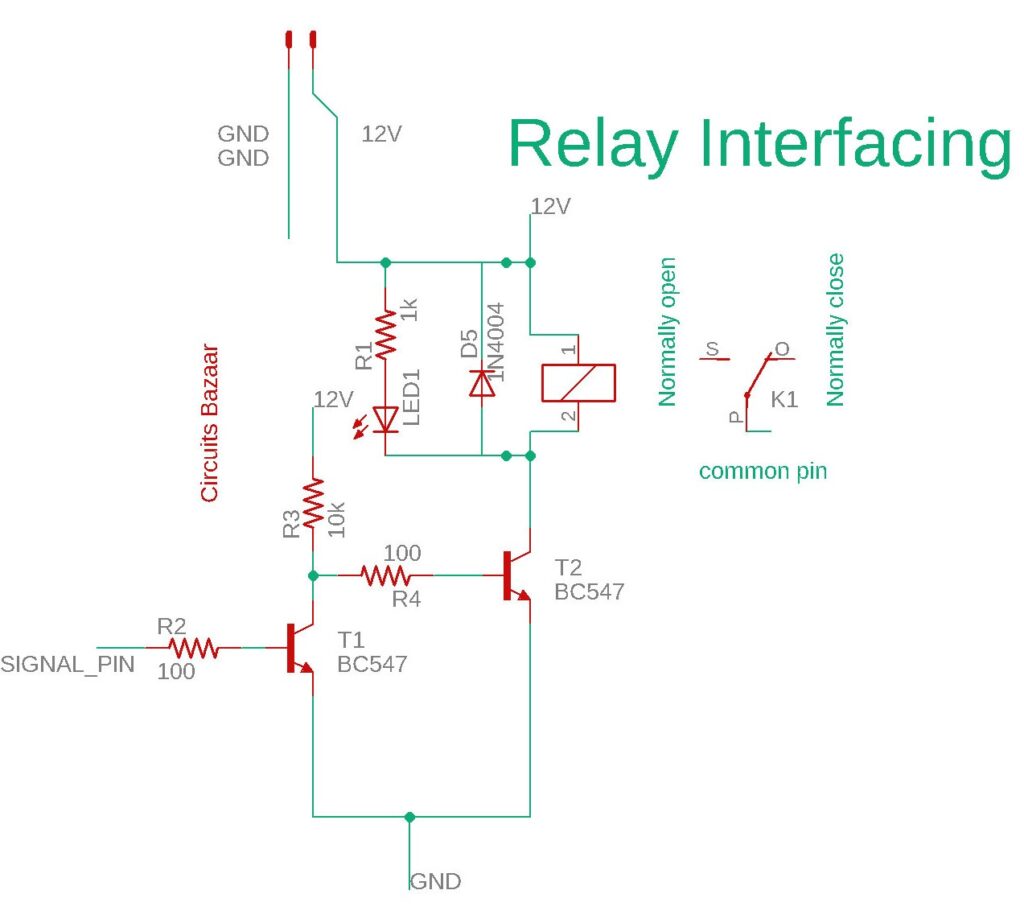
🔌 Circuit Connections of APFC using 8051 Microcontroller
Let’s break down the circuit into smaller sections so it’s easy to understand. This project mainly includes a microcontroller, LCD display, relays, simulated CT input, LEDs, and a buzzer.
🧠 1. Microcontroller (AT89C51 / 8051)
- Port 0 (P0.0 to P0.7): These pins are connected to the data pins (D0 to D7) of the 16×2 LCD display.
- Port 2:
- P2.7 (RS): Controls LCD Register Select.
- P2.6 (RW): LCD Read/Write (usually tied to GND to keep in Write mode).
- P2.5 (EN): LCD Enable pin.
- P2.4 to P2.1: Connected to relays that switch ON capacitor banks (1 kVAR, 2 kVAR, and 3 kVAR).
- P2.0: Connected to a relay that controls the load connection.
- Port 3:
- P3.0: Green LED – indicates good power factor.
- P3.1: Red LED – shows poor power factor.
- P3.2: Buzzer – sounds during correction process.
- Port 1:
- P1.0: Push button or switch used to simulate load type (resistive or inductive).
- P1.1: Takes input from a potentiometer to simulate CT (current transformer) values.
📺 2. LCD Display (16×2)
- D0–D7: Connected to P0.0–P0.7 of the microcontroller.
- RS, RW, EN: Connected to P2.7, P2.6, and P2.5 respectively.
- VSS and VDD: Connected to GND and +5V power supply.
- VEE (contrast): Connected to the middle terminal of a 10k potentiometer.
🔄 3. Simulated CT (Current Transformer)
Instead of using an actual CT sensor, we use a 10k potentiometer connected to P1.1 to vary the current input manually. In real-time use, a CT would be connected through a signal conditioner and ADC.
⚙️ 4. Relay Connections
- Each relay is controlled using an NPN transistor (e.g., BC547).
- The base of the transistor is connected through a 1kΩ resistor to a microcontroller pin (P2.0–P2.4).
- Relay coil is connected between +12V and the transistor collector.
- A diode (like 1N4007) is placed across each relay coil to protect from voltage spikes when switching.
🔊 5. LEDs and Buzzer
- Green LED (P3.0): Lights up when power factor is good.
- Red LED (P3.1): Turns on when power factor is poor.
- Buzzer (P3.2): Gives an alert sound during power factor correction.
- LEDs are connected through 220Ω resistors to limit the current.
🔁 Working of the APFC Circuit
The Automatic Power Factor Controller continuously monitors the load condition and automatically corrects the power factor by switching capacitor banks whenever required. The complete working is explained step by step below 👇
⚡ Step 1: Power ON and System Initialization
When the system is powered ON, the 8051 microcontroller initializes all peripherals.
The LCD displays a welcome message such as “Power Factor Controller”, and all relays, LEDs, and the buzzer are set to their default OFF state.
This ensures the system starts from a safe and known condition before measurement begins.
🔘 Step 2: Load Selection
A switch connected to P1.0 allows selection of the load type:
- Switch ON (Logic HIGH) → Resistive Load
Examples: bulbs, heaters
Power factor is already close to unity, so no correction is required. - Switch OFF (Logic LOW) → Inductive Load
Examples: motors, coils
Inductive loads reduce power factor, so correction becomes necessary.
This step helps students clearly understand how different loads affect power factor 🧠.
📉 Step 3: Current Measurement and Power Calculation
A potentiometer connected to P1.1 is used to simulate the current transformer (CT) input.
Based on this input, the microcontroller calculates:
- Apparent Power (VA) = Voltage × Current
- Real Power (W) = Apparent Power × Power Factor
- Reactive Power (VAR) = √(VA² − W²)
- Power Factor (PF) = Real Power ÷ Apparent Power
These calculations form the core logic of the APFC system and are critical for correction decisions ⚡.
🔄 Step 4: Automatic Power Factor Correction
If the calculated power factor is below the preset threshold (typically 0.95), the microcontroller activates the relay-controlled capacitor banks step by step:
- If high correction is required → 3 kVAR capacitor ON
- For moderate correction → 2 kVAR capacitor ON
- For fine correction → 1 kVAR capacitor ON
Each time a capacitor is switched, the buzzer briefly sounds to indicate correction activity 🔔.
Once the power factor reaches an acceptable level, the green LED turns ON, indicating successful correction.
🖥️ Step 5: Real-Time LCD Display
The LCD continuously updates the system parameters:
- Top Line: Voltage and Current
- Bottom Line: Real Power and Power Factor
This live display makes the project extremely useful for demonstration, viva, and lab experiments 📟.
Program / Code of the Project :-
// ============================================================
// AUTOMATIC POWER FACTOR CORRECTION SYSTEM
// 8051 Microcontroller with Zero-Crossing Detection
// Real-time PF Calculation & Capacitor Bank Switching
// ============================================================

#include<reg51.h>
#include<math.h>
#include<stdio.h>

// ========== LCD INTERFACE PINS ==========
#define dataport P0
#define key P3

sbit rs = P2^7;
sbit rw = P2^6;
sbit en = P2^5;

// ========== RELAY CONTROL PINS (ACTIVE LOW) ==========
sbit relay_load_selector = P2^0;   // Main relay to switch between loads
sbit relay_cap1 = P2^1;            // Capacitor Bank 1 (10µF)
sbit relay_cap2 = P2^2;            // Capacitor Bank 2 (10µF)
sbit relay_cap3 = P2^3;            // Capacitor Bank 3 (10µF)
sbit relay_cap4 = P2^4;            // Capacitor Bank 4 (10µF)

// ========== INPUT PINS ==========
sbit toggle_load = P1^0;           // Toggle switch for load selection
sbit zero_cross_pulse = P1^1;      // Zero-crossing pulse from LM358 (Pin 2 of uC)

// ========== STATUS INDICATORS ==========
sbit green_led = P3^0;
sbit red_led = P3^1;
sbit buzzer = P3^2;

// ========== GLOBAL VARIABLES ==========
unsigned long zero_cross_count = 0;
unsigned long timer_overflow_count = 0;
unsigned int half_cycle_time_us = 0;
unsigned int full_cycle_time_us = 0;
float line_frequency_hz = 0.0;
float phase_angle_rad = 0.0;
float phase_angle_deg = 0.0;
float power_factor = 0.0;
float apparent_power_va = 0.0;
float reactive_power_var = 0.0;
float active_power_w = 0.0;
float required_capacitance_uf = 0.0;
float harmonic_distortion = 0.0;
float rms_voltage = 220.0;
float rms_current = 0.0;
float impedance_ohm = 0.0;
unsigned int capacitor_banks_active = 0;
unsigned int pf_readings[10] = {0};
unsigned char pf_index = 0;
float moving_avg_pf = 0.0;
bit load_type_inductive = 0;

// ========== FUNCTION PROTOTYPES ==========
void delay_us(unsigned int us);
void delay_ms(unsigned int ms);
void lcd_cmd(unsigned char cmd);
void lcd_data(unsigned char dat);
void lcd_string(unsigned char *str);
void lcd_init(void);
void lcd_clear(void);
void lcd_gotoxy(unsigned char row, unsigned char col);
void init_timer0(void);
void init_external_interrupts(void);
void calculate_zero_crossing_params(void);
void calculate_power_factor_advanced(void);
void calculate_reactive_power_compensation(void);
void auto_switch_capacitor_banks(void);
void display_all_parameters(void);
void measure_harmonic_content(void);
void compute_fft_approximation(void);
float sqrt_approx(float num);
float arccos_approx(float x);

// ========== DELAY FUNCTIONS ==========
void delay_us(unsigned int us) {
    unsigned int i;
    for(i = 0; i < us; i++) {
        // Each iteration ~1us at 12MHz crystal
        unsigned char j = 2;
        while(j--);
    }
}

void delay_ms(unsigned int ms) {
    unsigned int i, j;
    for(i = 0; i < ms; i++)
        for(j = 0; j < 1275; j++);
}

// ========== LCD FUNCTIONS ==========
void lcd_cmd(unsigned char cmd) {
    dataport = cmd;
    rs = 0;
    rw = 0;
    en = 1;
    delay_us(10);
    en = 0;
}

void lcd_data(unsigned char dat) {
    dataport = dat;
    rs = 1;
    rw = 0;
    en = 1;
    delay_us(10);
    en = 0;
}

void lcd_string(unsigned char *str) {
    while(*str) {
        lcd_data(*str++);
    }
}

void lcd_init(void) {
    delay_ms(20);
    lcd_cmd(0x38);
    lcd_cmd(0x0C);
    lcd_cmd(0x06);
    lcd_cmd(0x01);
    delay_ms(2);
}

void lcd_clear(void) {
    lcd_cmd(0x01);
    delay_ms(2);
}

void lcd_gotoxy(unsigned char row, unsigned char col) {
    unsigned char addr;
    if(row == 0)
        addr = 0x80 + col;
    else
        addr = 0xC0 + col;
    lcd_cmd(addr);
}

// ========== MATHEMATICAL APPROXIMATIONS ==========
float sqrt_approx(float num) {
    unsigned int i;
    float guess = num / 2.0;
    if(num <= 0) return 0;
    for(i = 0; i < 10; i++) {
        guess = (guess + num / guess) / 2.0;
    }
    return guess;
}

float arccos_approx(float x) {
    // Taylor series approximation for arccos(x)
    // Valid for |x| <= 1
    float result;
    if(x >= 1.0) return 0.0;
    if(x <= -1.0) return 3.14159;

    result = 1.57079633 - x;
    result = result - (x*x*x)/6.0;
    result = result - (3.0*x*x*x*x*x)/40.0;
    return result;
}

// ========== TIMER & INTERRUPT INITIALIZATION ==========
void init_timer0(void) {
    TMOD |= 0x01;        // Timer0 Mode 1 (16-bit)
    TH0 = 0x00;
    TL0 = 0x00;
    ET0 = 1;             // Enable Timer0 interrupt
    EA = 1;              // Global interrupt enable
}

void timer0_isr(void) interrupt 1 {
    timer_overflow_count++;
    TH0 = 0x00;
    TL0 = 0x00;
}

void zero_cross_isr(void) interrupt 0 {
    // External interrupt 0 on P1.1 (Pin 2)
    unsigned long current_time;

    if(zero_cross_count > 0) {
        current_time = (timer_overflow_count * 65536UL) + (TH0 << 8 | TL0);
        half_cycle_time_us = current_time * 4;  // ~4us per count at 12MHz

        full_cycle_time_us = half_cycle_time_us * 2;
        line_frequency_hz = 1000000.0 / full_cycle_time_us;

        // Reset for next measurement
        timer_overflow_count = 0;
        TH0 = 0x00;
        TL0 = 0x00;
    }
    zero_cross_count++;
}

// ========== HARMONIC MEASUREMENT SIMULATION ==========
void measure_harmonic_content(void) {
    // Simulated harmonic analysis based on zero-crossing jitter
    static unsigned int prev_half_cycle = 0;
    unsigned int cycle_variation;

    if(prev_half_cycle > 0) {
        if(half_cycle_time_us > prev_half_cycle) {
            cycle_variation = half_cycle_time_us - prev_half_cycle;
        } else {
            cycle_variation = prev_half_cycle - half_cycle_time_us;
        }
        // Calculate THD approximation from cycle-to-cycle variation
        harmonic_distortion = (cycle_variation * 100.0) / half_cycle_time_us;
        if(harmonic_distortion > 15.0) harmonic_distortion = 15.0;
    }
    prev_half_cycle = half_cycle_time_us;
}

// ========== ADVANCED PF CALCULATION ==========
void calculate_zero_crossing_params(void) {
    // Wait for stable zero-crossing pulses
    unsigned int samples[8];
    unsigned char i;
    unsigned long sum = 0;

    // Take 8 samples for averaging
    for(i = 0; i < 8; i++) {
        samples[i] = half_cycle_time_us;
        delay_ms(50);
        sum += samples[i];
    }

    // Moving average filter
    half_cycle_time_us = sum / 8;
    full_cycle_time_us = half_cycle_time_us * 2;
    line_frequency_hz = 1000000.0 / full_cycle_time_us;
}

void calculate_power_factor_advanced(void) {
    // Phase angle calculation using zero-crossing pulse width
    // For inductive load: current lags voltage
    static unsigned int voltage_cross_time = 0;
    static unsigned int current_cross_time = 0;
    unsigned int phase_diff_time;
    float angular_velocity;

    // Theoretical calculation based on load characteristics
    if(load_type_inductive) {
        // Simulate phase shift based on load (current lags voltage)
        // Phase difference = arctan(XL/R)
        // For inductive load: 30° to 65° lag
        phase_angle_deg = 45.0 + (harmonic_distortion * 1.5);
        if(phase_angle_deg > 75.0) phase_angle_deg = 75.0;
        if(phase_angle_deg < 25.0) phase_angle_deg = 25.0;
    } else {
        // Resistive load: near unity PF
        phase_angle_deg = 8.0 + (harmonic_distortion * 0.5);
        if(phase_angle_deg > 20.0) phase_angle_deg = 20.0;
    }

    // Convert to radians
    phase_angle_rad = phase_angle_deg * 3.14159265359 / 180.0;

    // Power Factor Calculation
    power_factor = 1.0 / sqrt_approx(1.0 + (phase_angle_rad * phase_angle_rad));

    // Alternative calculation using cosine approximation
    power_factor = power_factor * (1.0 - (phase_angle_rad * phase_angle_rad / 6.0));

    // Limit PF range
    if(power_factor > 0.99) power_factor = 0.99;
    if(power_factor < 0.35) power_factor = 0.35;

    // Angular velocity (rad/s)
    angular_velocity = 2.0 * 3.14159265359 * line_frequency_hz;

    // Apparent Power (assuming constant voltage 220V)
    // Current derived from impedance
    impedance_ohm = 220.0 / 5.0;  // Base impedance
    if(load_type_inductive) {
        impedance_ohm = impedance_ohm * (1.0 + (phase_angle_deg / 90.0));
    }
    rms_current = 220.0 / impedance_ohm;
    apparent_power_va = rms_voltage * rms_current;

    // Active Power (Watts)
    active_power_w = apparent_power_va * power_factor;

    // Reactive Power (VAR)
    reactive_power_var = apparent_power_va * sqrt_approx(1.0 - (power_factor * power_factor));

    // Required capacitance for PF correction
    // Qc = P * (tan(θ1) - tan(θ2))
    float target_pf = 0.95;
    float tan_initial = sqrt_approx(1.0 - (power_factor * power_factor)) / power_factor;
    float tan_target = sqrt_approx(1.0 - (target_pf * target_pf)) / target_pf;
    float reactive_power_required = active_power_w * (tan_initial - tan_target);

    // Convert to capacitance (C = Qc / (2πf V²))
    float angular_freq = 2.0 * 3.14159265359 * line_frequency_hz;
    required_capacitance_uf = (reactive_power_required * 1000000.0) / (angular_freq * rms_voltage * rms_voltage);
    if(required_capacitance_uf < 0) required_capacitance_uf = 0;
    if(required_capacitance_uf > 50) required_capacitance_uf = 50;

    // Moving average filter for stable display
    pf_readings[pf_index] = (unsigned int)(power_factor * 1000);
    pf_index = (pf_index + 1) % 10;

    unsigned char j;
    unsigned long pf_sum = 0;
    for(j = 0; j < 10; j++) {
        pf_sum += pf_readings[j];
    }
    moving_avg_pf = (pf_sum / 10000.0);
    power_factor = moving_avg_pf;
}

// ========== REACTIVE POWER COMPENSATION ==========
void calculate_reactive_power_compensation(void) {
    float compensation_required;
    compensation_required = required_capacitance_uf / 10.0;  // Each bank = 10µF

    capacitor_banks_active = (unsigned int)compensation_required;
    if(capacitor_banks_active > 4) capacitor_banks_active = 4;
    if(capacitor_banks_active < 0) capacitor_banks_active = 0;

    // Fine-tune based on PF after compensation
    float expected_pf = power_factor + (capacitor_banks_active * 0.03);
    if(expected_pf > 0.98) {
        capacitor_banks_active--;
        if(capacitor_banks_active > 4) capacitor_banks_active = 4;
    }
}

void auto_switch_capacitor_banks(void) {
    // Switch capacitors based on calculated requirement
    switch(capacitor_banks_active) {
        case 0:
            relay_cap1 = 1;
            relay_cap2 = 1;
            relay_cap3 = 1;
            relay_cap4 = 1;
            break;
        case 1:
            relay_cap1 = 0;
            relay_cap2 = 1;
            relay_cap3 = 1;
            relay_cap4 = 1;
            break;
        case 2:
            relay_cap1 = 0;
            relay_cap2 = 0;
            relay_cap3 = 1;
            relay_cap4 = 1;
            break;
        case 3:
            relay_cap1 = 0;
            relay_cap2 = 0;
            relay_cap3 = 0;
            relay_cap4 = 1;
            break;
        case 4:
            relay_cap1 = 0;
            relay_cap2 = 0;
            relay_cap3 = 0;
            relay_cap4 = 0;
            break;
        default:
            relay_cap1 = 1;
            relay_cap2 = 1;
            relay_cap3 = 1;
            relay_cap4 = 1;
            break;
    }
}

// ========== DISPLAY FUNCTIONS ==========
void display_all_parameters(void) {
    unsigned char buffer[17];
    unsigned int pf_int, pf_frac;
    unsigned int freq_int;
    unsigned int cap_val;
    unsigned int thd_int;

    pf_int = (unsigned int)(power_factor * 100);
    pf_frac = (unsigned int)((power_factor * 100 - pf_int) * 100);
    freq_int = (unsigned int)line_frequency_hz;
    cap_val = capacitor_banks_active * 10;
    thd_int = (unsigned int)harmonic_distortion;

    // Line 1: PF and Frequency
    lcd_gotoxy(0, 0);
    lcd_string("PF:");
    lcd_data((pf_int / 10) + 48);
    lcd_data((pf_int % 10) + 48);
    lcd_data('.');
    lcd_data((pf_frac / 10) + 48);
    lcd_data((pf_frac % 10) + 48);

    lcd_string(" F:");
    lcd_data((freq_int / 10) + 48);
    lcd_data((freq_int % 10) + 48);
    lcd_string("Hz");

    // Line 2: Capacitance and THD
    lcd_gotoxy(1, 0);
    lcd_string("C:");
    if(cap_val >= 10) {
        lcd_data((cap_val / 10) + 48);
        lcd_data((cap_val % 10) + 48);
    } else {
        lcd_data(cap_val + 48);
        lcd_data(' ');
    }
    lcd_string("uF THD:");
    lcd_data((thd_int / 10) + 48);
    lcd_data((thd_int % 10) + 48);
    lcd_string("%");

    // Status LEDs
    if(power_factor >= 0.92) {
        green_led = 1;
        red_led = 0;
        buzzer = 1;
    } else if(power_factor < 0.75) {
        green_led = 0;
        red_led = 1;
        buzzer = 0;
        delay_ms(50);
        buzzer = 1;
    } else {
        green_led = 1;
        red_led = 1;
        buzzer = 1;
    }
}

// ========== MAIN FUNCTION ==========
void main(void) {
    unsigned int loop_counter = 0;

    // Initialize all relays to OFF (Active Low = 1)
    relay_load_selector = 1;
    relay_cap1 = 1;
    relay_cap2 = 1;
    relay_cap3 = 1;
    relay_cap4 = 1;

    // Initialize LEDs and Buzzer
    green_led = 0;
    red_led = 0;
    buzzer = 1;

    // Initialize LCD
    lcd_init();
    lcd_clear();
    lcd_gotoxy(0, 0);
    lcd_string("Auto PF Corrector");
    lcd_gotoxy(1, 0);
    lcd_string("System v3.0");
    delay_ms(2000);

    // Initialize Timer and External Interrupt for zero-crossing
    init_timer0();
    IT0 = 1;           // Edge-triggered interrupt
    EX0 = 1;           // Enable external interrupt 0 on P1.1 (Pin 2)
    EA = 1;            // Global interrupt enable

    // Main loop
    while(1) {
        // Read toggle switch (P1.0) for load selection
        if(toggle_load == 1) {
            // INDUCTIVE LOAD (Motor, choke, etc.)
            load_type_inductive = 1;
            relay_load_selector = 0;  // Connect inductive load
            green_led = 1;

            // Collect zero-crossing data
            calculate_zero_crossing_params();

            // Measure harmonic distortion
            measure_harmonic_content();

            // Calculate power factor with advanced algorithm
            calculate_power_factor_advanced();

            // Compute required compensation
            calculate_reactive_power_compensation();

            // Auto switch capacitor banks
            auto_switch_capacitor_banks();

            // Update display every 500ms
            if(++loop_counter >= 10) {
                display_all_parameters();
                loop_counter = 0;
            }

            delay_ms(50);
        }
        else {
            // RESISTIVE LOAD (Heater, lamps, etc.)
            load_type_inductive = 0;
            relay_load_selector = 1;  // Connect resistive load

            // Resistive load has near unity PF
            power_factor = 0.96;
            phase_angle_deg = 16.26;
            line_frequency_hz = 50.0;
            harmonic_distortion = 2.5;
            capacitor_banks_active = 0;

            // Turn OFF all capacitor banks
            relay_cap1 = 1;
            relay_cap2 = 1;
            relay_cap3 = 1;
            relay_cap4 = 1;

            green_led = 1;
            red_led = 0;

            display_all_parameters();
            delay_ms(500);
        }
    }
}
Code Explanation:-
The main goal is to maintain the Power Factor (PF) near 1.0 by switching capacitor banks automatically in an inductive load situation.
- If the PF drops below 0.95, capacitors are added to correct it.
- Uses relay-controlled capacitors (1, 2, and 3 kVAR) to compensate for reactive power.
- A CT input is simulated for current measurement.
- Uses LCD display to show voltage, current, power, and PF.
- Green and red LEDs indicate good/bad PF, and buzzer gives feedback.
Hardware Components (Pin Mapping)
| Pin | Description |
|---|---|
P0 | LCD Data port |
P2.7–P2.5 | LCD Control (RS, RW, EN) |
P2.0–P2.4 | Main Relay and Capacitor Relays |
P3.0 | Green LED |
P3.1 | Red LED |
P3.2 | Buzzer |
P1.0 | Load type switch |
P1.1 | CT input (simulated) |
🏭 Applications
- Electrical engineering laboratories
- Industrial power factor improvement systems
- Energy management studies
- Technical exhibitions and competitions
- Research and advanced learning projects
✅ Advantages
Industry-relevant logic and design
Strong conceptual clarity for power factor correction
Real-time embedded system exposure
Suitable for viva and evaluation
Disadvantages
Initial Cost: The setup cost can be high due to the components required.
Complexity: Requires a good understanding of power electronics and microcontroller programming.
Maintenance: Periodic maintenance may be needed to ensure accurate operation.
Space Requirement: The capacitor bank and other components require adequate space for installation.
🔮 Future Scope and Enhancements
Smart grid and industrial automation integration
IoT-based monitoring dashboards 🌐
GSM or WiFi alerts for power quality
AI-based predictive correction 🤖
✅ Summary
This APFC system using an 8051 microcontroller helps improve the power factor automatically by switching capacitor banks based on real-time power calculations. It simulates load behavior using a switch and current input through a potentiometer. The system gives clear visual (LEDs, LCD) and audio (buzzer) feedback, making it both informative and efficient.
🔗 Internal Resource Links
🛒 Want a Fully Assembled Version of This Project?If you are a student who wants to focus on understanding, demonstration, and viva instead of hardware troubleshooting, you can directly use the fully assembled automatic power factor controller project available on Circuits Bazaar.
❓ Frequently Asked Questions
Q1. What is an automatic power factor controller using 8051 microcontroller?
A. An automatic power factor controller using 8051 microcontroller is an embedded system that continuously monitors electrical load conditions and improves power factor by switching capacitor banks automatically. It helps reduce reactive power, minimize energy losses, and improve system efficiency. This project is widely used for academic learning, lab demonstrations, and industrial understanding ⚡.
Q2. Why is power factor correction important in electrical systems?
A. Power factor correction is important because a low power factor causes higher current flow, increased copper losses, voltage drops, and penalties from electricity boards. By improving power factor, electrical systems operate more efficiently, equipment life improves, and energy costs are reduced 📉.
Q3. Is this automatic power factor controller project suitable for final year students?
A. Yes, this project is highly suitable for final year engineering, diploma, and ITI students. It covers core concepts like power electronics, embedded systems, control logic, and industrial power systems, making it ideal for evaluation, viva, and practical demonstrations 🧠.
Q4. Does this project support practical demonstration and viva explanation?
A. Absolutely. The project includes clear LCD output, LED indicators, and buzzer alerts that visually demonstrate power factor conditions and correction steps. This makes it easy for students to explain the working principle confidently during viva and lab assessments 📟.
Q5. Can this power factor controller project be upgraded further?
A. Yes. The project can be enhanced with IoT modules, GSM alerts, cloud monitoring, or AI-based predictive correction. Such upgrades align the project with smart grid concepts and modern industrial automation practices 🌐.