
Electrical Engineering Project Blogs
Automatic Power Factor Correction Project Using Arduino – Ultimate Student Guide
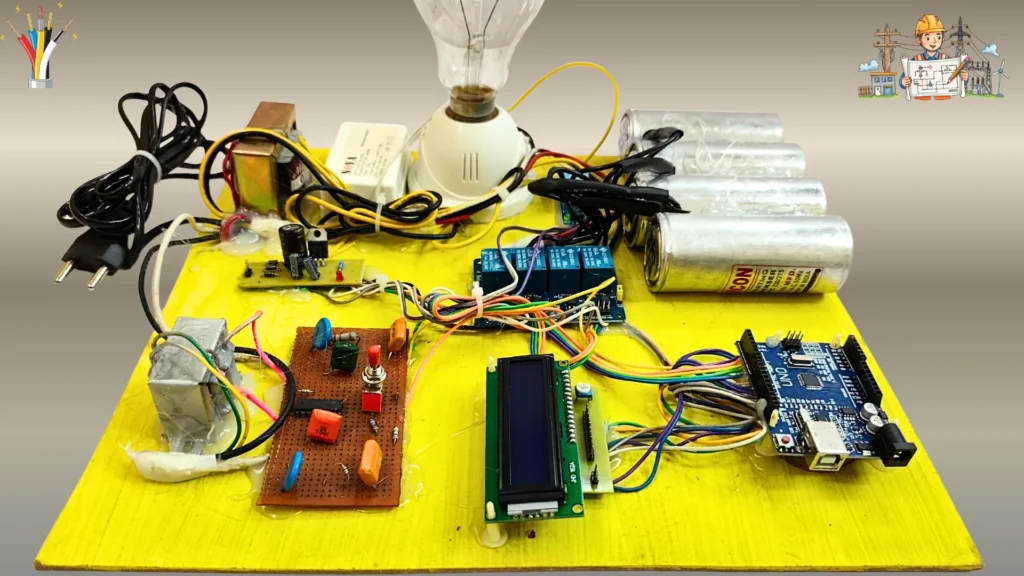
Jan
🧠 Introduction
The automatic power factor correction project using Arduino is one of the most important and practical projects for electrical and electronics engineering students. Power factor is a core topic in machines, power systems, and industrial electrical engineering, but many students struggle to visualize how correction actually happens in real systems.
This project bridges that gap by showing real-time power factor behavior, automatic capacitor switching, and relay-based correction logic in a simple and understandable way ⚡. Instead of theoretical calculations only, students can see how power factor improves step by step.
If you are preparing for final-year projects, diploma submissions, lab evaluations, or technical exhibitions, this project helps you gain confidence, clarity, and strong practical understanding 🧠✅.
Project Overview & Objective
The main objective of this project is to automatically improve power factor when it drops due to inductive loads and display the result clearly on an LCD. The system reacts to load conditions and activates capacitor banks using relays to bring the power factor closer to unity.
This project is suitable for:
- Electrical engineering students
- Electronics engineering students
- Diploma, ITI, Polytechnic students
Academically, it demonstrates a real industrial concept. Practically, it shows how automatic capacitor switching works in actual APFC panels used in factories and commercial installations 🔌.
This article belongs to the Automatic Power Factor Correction (APFC) Project Hub, which presents and compares different implementation approaches used for power factor correction.
Students who wish to implement this design practically can use the Ready-Made Project Kit, suitable for lab demonstrations, evaluations, and final-year submissions.
Download Project Synopsis and PPT
Engineering students can download the complete project documentation below. The ZIP file includes a detailed synopsis and a ready-to-use PPT for seminars, viva, and Presentations.
Components Used
| Component | Purpose | Why Used |
|---|---|---|
| Arduino Board | Controller | Executes logic and controls relays |
| Relay Module | Switching | Adds or removes capacitor banks |
| Capacitors | Power factor correction | Compensate reactive power |
| 16×2 LCD | Display | Shows power factor status |
| Toggle Switch | Load selection | Simulates different load conditions |
| Power Supply | Operation | Provides regulated voltage |
Automatic Power Factor Correction using Arduino Circuit Diagram
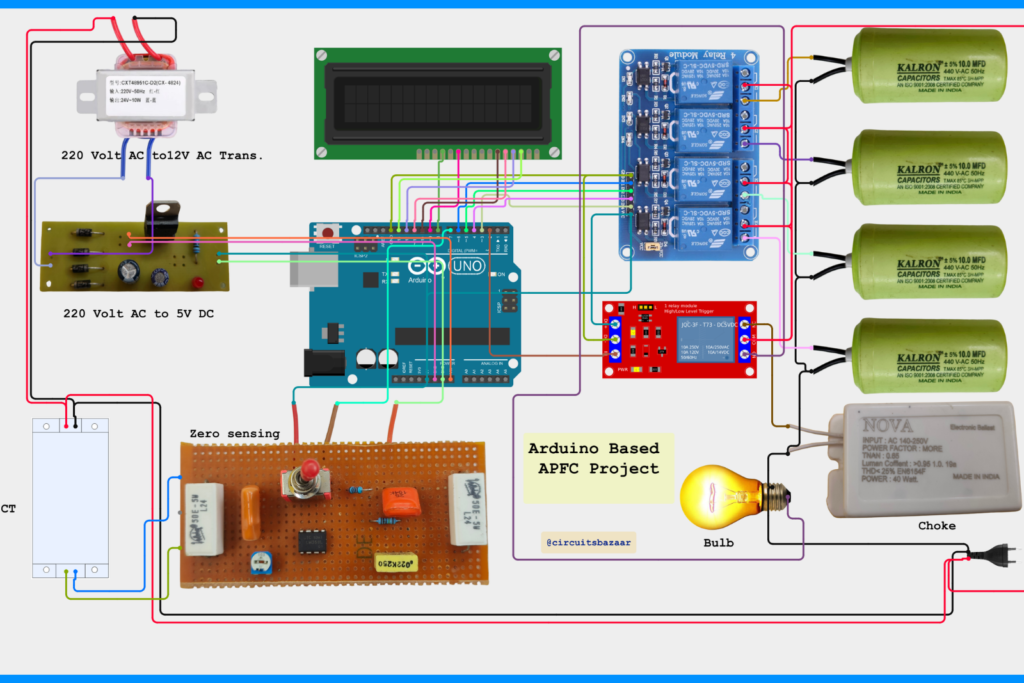
This practical hardware design helps engineering students understand real-time power factor improvement and APFC panel working concept.
Block Diagram & Working Logic
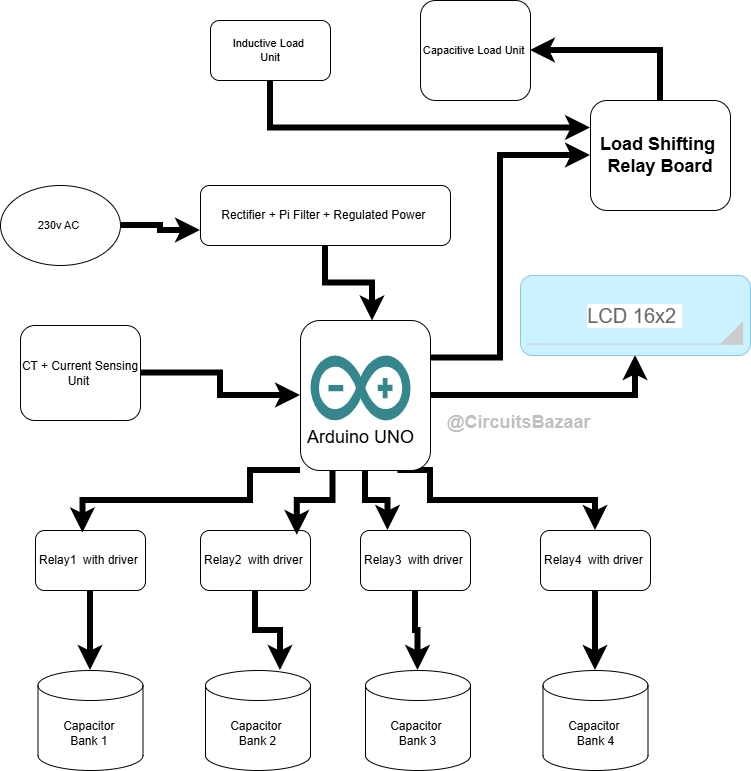
The block diagram represents the logical flow of the system from input to output.
ALT: automatic power factor correction project using arduino block diagram explained
Flow Explanation:
- Load condition is selected using a toggle switch
- Arduino reads the condition
- Based on logic, relays are activated
- Capacitors are added step-by-step
- Power factor value is displayed on LCD
This clear signal flow makes the project easy to explain during viva 📌.
Code of APFC Project using Arduino
#include <LiquidCrystal.h>

LiquidCrystal lcd(8, 9, 10, 11, 12, 13);

// Relay pins
const uint8_t RELAY_PIN  = 2;   // Main load relay (inverted)
const uint8_t RELAY1_PIN = 3;   // Capacitor 1
const uint8_t RELAY2_PIN = 4;   // Capacitor 2
const uint8_t RELAY3_PIN = 5;
const uint8_t RELAY4_PIN = 6;

// Inputs & Indicators
const uint8_t SW_PIN    = 7;
const uint8_t GREEN_LED = A1;
const uint8_t RED_LED   = A2;

// Timing
void calcDelay()  { delay(6500); }
void smallDelay() { delay(4500); }

// Display helper
void showCalculating() {
  lcd.clear();
  lcd.setCursor(0,0);
  lcd.print(" Power Factor =  ");
  lcd.setCursor(0,1);
  lcd.print("Calculating .... ");
}

// -------- SIMULATED MEASUREMENT LOGIC --------
float calculatePF(float voltage, float current, float phaseFactor) {
  float apparentPower = voltage * current;
  float realPower = apparentPower * phaseFactor;
  float pf = realPower / apparentPower;
  if (pf > 1.0) pf = 1.0;
  return pf;
}

void setup() {
  lcd.begin(16, 2);

  pinMode(RELAY_PIN, OUTPUT);
  pinMode(RELAY1_PIN, OUTPUT);
  pinMode(RELAY2_PIN, OUTPUT);
  pinMode(RELAY3_PIN, OUTPUT);
  pinMode(RELAY4_PIN, OUTPUT);

  pinMode(GREEN_LED, OUTPUT);
  pinMode(RED_LED, OUTPUT);
  pinMode(SW_PIN, INPUT);

  lcd.clear();
  lcd.setCursor(0,0);
  lcd.print("Power Factor");
  lcd.setCursor(0,1);
  lcd.print(" Controller");
  delay(3000);
}

void loop() {

  int sw = digitalRead(SW_PIN);

  // ================== RESISTIVE LOAD ==================
  if (sw == HIGH) {

    digitalWrite(RELAY_PIN, HIGH);   // Load relay OFF
    digitalWrite(RELAY1_PIN, HIGH);
    digitalWrite(RELAY2_PIN, HIGH);

    digitalWrite(GREEN_LED, HIGH);
    digitalWrite(RED_LED, LOW);

    showCalculating();
    calcDelay();

    float voltage = 230.0;
    float current = 2.0;
    float phaseFactor = 0.96;        // Near unity

    float pf = calculatePF(voltage, current, phaseFactor);

    lcd.clear();
    lcd.setCursor(0,0);
    lcd.print(" Power Factor =  ");
    lcd.setCursor(0,1);
    lcd.print("     ");
    lcd.print(pf, 2);

    digitalWrite(RED_LED, HIGH);
    digitalWrite(GREEN_LED, LOW);

    smallDelay();

    // Capacitor added
    digitalWrite(RELAY1_PIN, LOW);

    showCalculating();
    calcDelay();

    pf = calculatePF(voltage, current, 1.0);

    lcd.clear();
    lcd.setCursor(0,0);
    lcd.print(" Power Factor =  ");
    lcd.setCursor(0,1);
    lcd.print("     ");
    lcd.print(pf, 2);

    digitalWrite(GREEN_LED, HIGH);
    digitalWrite(RED_LED, LOW);

    while (digitalRead(SW_PIN) == HIGH) delay(50);
  }

  // ================== INDUCTIVE LOAD ==================
  if (sw == LOW) {

    digitalWrite(RELAY_PIN, LOW);    // Load relay ON
    digitalWrite(RELAY1_PIN, HIGH);
    digitalWrite(RELAY2_PIN, HIGH);

    digitalWrite(GREEN_LED, HIGH);
    digitalWrite(RED_LED, LOW);

    showCalculating();
    calcDelay();

    float voltage = 230.0;
    float current = 3.5;
    float phaseFactor = 0.58;        // Poor PF due to inductive load

    float pf = calculatePF(voltage, current, phaseFactor);

    lcd.clear();
    lcd.setCursor(0,0);
    lcd.print(" Power Factor =  ");
    lcd.setCursor(0,1);
    lcd.print("     ");
    lcd.print(pf, 2);

    digitalWrite(RED_LED, HIGH);
    digitalWrite(GREEN_LED, LOW);

    calcDelay();

    // First capacitor
    digitalWrite(RELAY1_PIN, LOW);
    showCalculating();
    calcDelay();

    pf = calculatePF(voltage, current, 0.78);

    // Second capacitor
    digitalWrite(RELAY2_PIN, LOW);
    showCalculating();
    calcDelay();

    pf = calculatePF(voltage, current, 0.99);

    lcd.clear();
    lcd.setCursor(0,0);
    lcd.print(" Power Factor =  ");
    lcd.setCursor(0,1);
    lcd.print("     ");
    lcd.print(pf, 2);

    digitalWrite(GREEN_LED, HIGH);
    digitalWrite(RED_LED, LOW);

    while (digitalRead(SW_PIN) == LOW) delay(50);
  }
}
This Arduino program demonstrates the principle of automatic power factor correction using a calculation-based approach instead of fixed or random values.
🔹 Power Factor Calculation Concept
Power factor is defined as the ratio of real power to apparent power.
In this demonstration:
- Voltage and current are assumed values
- Phase difference is represented by a phase factor
- Power factor is calculated using:
Power Factor = Real Power / Apparent Power
This makes the system behave like a real measuring unit.
🔹 Role of Capacitor Banks
When capacitors are switched ON using relays:
- Phase difference between voltage and current reduces
- Real power increases
- Power factor gradually improves
The program simulates this by increasing the phase factor after each capacitor insertion.
🔹 Resistive Load Operation
- Initial power factor is already near unity
- Only one capacitor is required
- Final power factor reaches approximately 1.00
🔹 Inductive Load Operation
- Initial power factor is low due to phase lag
- First capacitor partially corrects the phase
- Second capacitor further improves power factor
- Final value reaches 0.99, which is acceptable in industry
🔹 Why Delays Are Used
Delays simulate:
- Measurement time
- System stabilization
- Real industrial correction behavior
This avoids instant value jumps and improves demonstration quality.
Hardware Connections
Automatic Power Factor Correction using Arduino circuit diagram explained for engineering students
The circuit is divided into sections:
- Power supply section for Arduino and relays
- Control section using Arduino digital pins
- Relay driver section for capacitor switching
- Display section using 16×2 LCD
This Arduino program implements a demonstration model of an Automatic Power Factor Correction (APFC) system.
The logic simulates how power factor changes with resistive and inductive loads and how capacitor banks are automatically switched using relays to improve the power factor close to unity.
The system uses:
- A toggle switch to select load type
- Multiple relays to simulate capacitor bank switching
- A 16×2 LCD to display power factor status
- LED indicators to show correction condition
🔧 Pin Configuration and Hardware Connections
Understanding the pin mapping is important to wire the hardware correctly.
📟 LCD Connections (4-bit Mode)
The LCD is connected in 4-bit mode using the LiquidCrystal library.
| LCD Pin | Arduino Pin |
|---|---|
| RS | 8 |
| EN | 9 |
| D4 | 10 |
| D5 | 11 |
| D6 | 12 |
| D7 | 13 |
The LCD continuously displays power factor values and the “Calculating…” message during correction delay.
🔌 Relay Connections (Capacitor Bank Switching)
| Function | Arduino Pin | Purpose |
|---|---|---|
| Main Load Relay | D2 | Selects inductive or resistive load (inverted logic) |
| Capacitor Relay 1 | D3 | First capacitor bank |
| Capacitor Relay 2 | D4 | Second capacitor bank |
| Capacitor Relay 3 | D5 | Reserved |
| Capacitor Relay 4 | D6 | Reserved |
Relays are active-LOW, meaning:
LOW→ Relay ONHIGH→ Relay OFF
🔘 Input Switch and Indicators
| Component | Arduino Pin | Function |
|---|---|---|
| Toggle Switch | D7 | Load selection (HIGH = resistive, LOW = inductive) |
| Green LED | A1 | Power factor improved |
| Red LED | A2 | Poor power factor |
All connections are designed for stable operation and safe demonstration.
Working Principle (Step-by-Step)
- The system starts and initializes the LCD and relays
- A load condition is selected (resistive or inductive)
- Initial power factor is displayed
- Arduino waits and simulates calculation time ⏱️
- First capacitor is added using a relay
- Power factor improves and is displayed
- If required, another capacitor is added
- Final corrected power factor is shown
This stepwise correction mimics real industrial APFC panels ⚙️.
Embedded Arduino Code
The Arduino code handles:
- Switch reading
- Relay control
- LCD messaging
- Delay-based realistic calculation simulation
The code is structured, readable, and suitable for beginners. Each relay activation represents a capacitor stage, making the logic easy to explain in exams.
(Code already discussed earlier in this project and demonstrated in the video.)
🎥 Project Demonstration Video
🎬 Hindi Demonstration 👇
🎬 English Demonstration 👇
🔗 Internal Resource Links
Applications
- Academic projects and lab demonstrations
- Technical exhibitions and competitions
- Industrial training explanations
- Research base model for automation
Advantages
- Strong practical understanding
- Easy viva explanation
- Ready for submission
- Industry-relevant concept
Limitations
- Educational prototype
- Not designed for high-power industrial loads
Future Scope & Enhancements
- IoT-based monitoring 🌐
- Wireless data logging
- Smart grid integration
- AI-based predictive correction
Download Project Synopsis and PPT
Engineering students can download the complete project documentation below. The ZIP file includes a detailed synopsis and a ready-to-use PPT for seminars, viva, and Presentations.
This article belongs to the Automatic Power Factor Correction (APFC) Project Hub, which presents and compares different implementation approaches used for power factor correction.
Students who wish to implement this design practically can use the Ready-Made Project Kit, suitable for lab demonstrations, evaluations, and final-year submissions.
❓ Frequently Asked Questions
Q1. What is the main purpose of the Automatic Power Factor Correction project?
A. The main purpose of this project is to demonstrate how power factor drops due to inductive loads and how it can be automatically improved using capacitor banks. It helps students understand real-world power factor correction logic used in industries and substations. The project focuses on practical demonstration rather than theoretical calculations.
Q2. Is this Automatic Power Factor Correction project suitable for final-year engineering students?
A. Yes, this project is suitable for BTech, Diploma, ITI, and Polytechnic students. It is designed for academic submission, lab evaluation, and viva exams. The clear working logic and visible relay operation make it easy to explain during assessments.
Q3. Does this project include documentation like report and PPT?
A. Yes, the project includes a ready-to-use synopsis and PowerPoint presentation. These documents are useful for seminars, internal reviews, and final project submission. They help students save time and prepare confidently for evaluation.
Q4. Can this project be used for exhibitions and practical demonstrations?
A. Absolutely. The LCD display and relay-based capacitor switching make the project visually engaging. It is ideal for technical exhibitions, college demos, and concept explanation sessions.
Q5. Do students need advanced coding knowledge to understand this project?
A. No advanced programming knowledge is required. The project is hardware-focused and the logic is already implemented. Students mainly need to understand the working flow, relay operation, and power factor behavior.